 WillisGSD · task manager
Getting things done,
without giving things away.
A local-first task manager built on the Getting Things Done® methodology — no backend server, no account, no internet required. Your tasks, projects, and goals live in a SQLite database on your device.
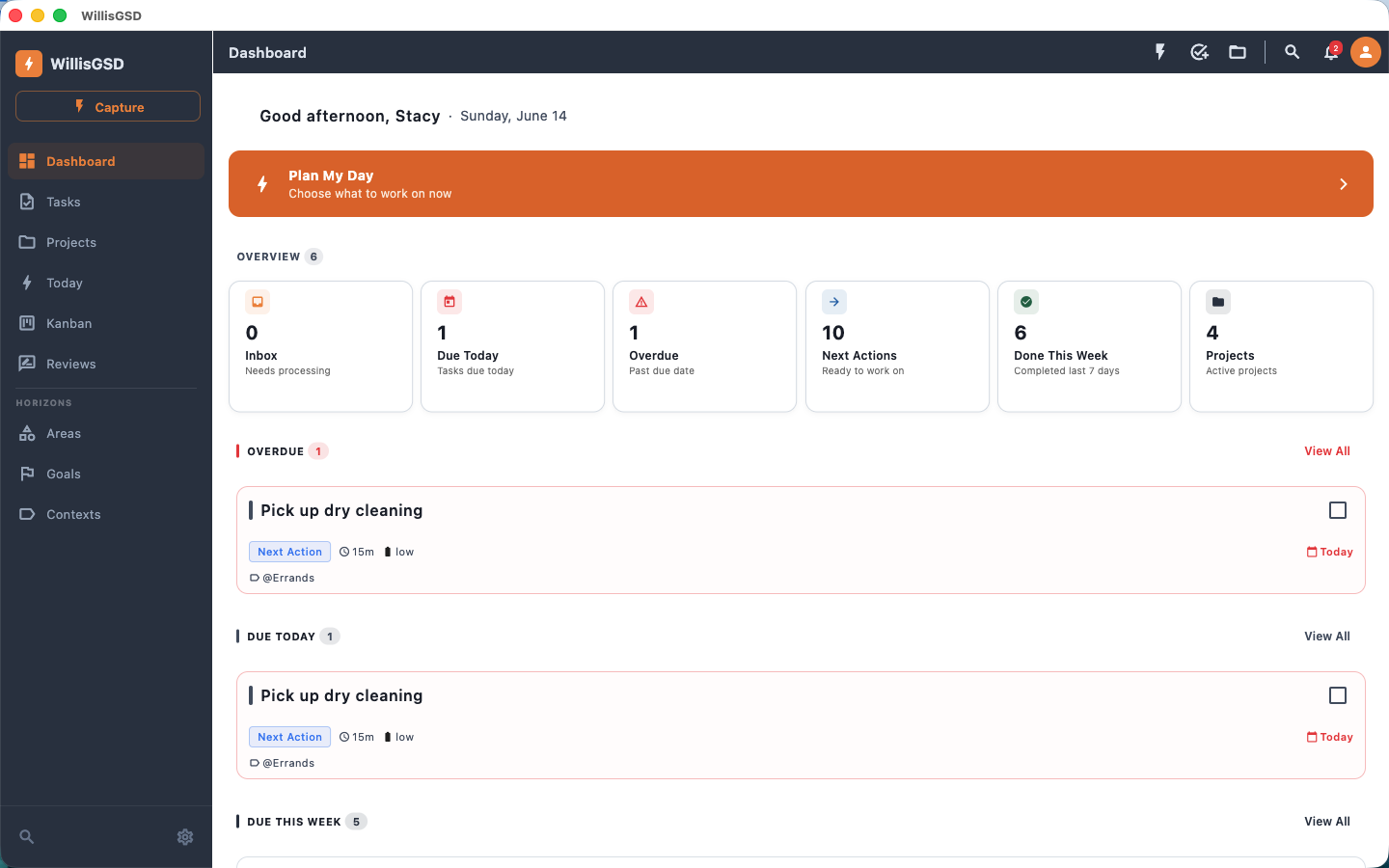
Calm to look at, fast to use
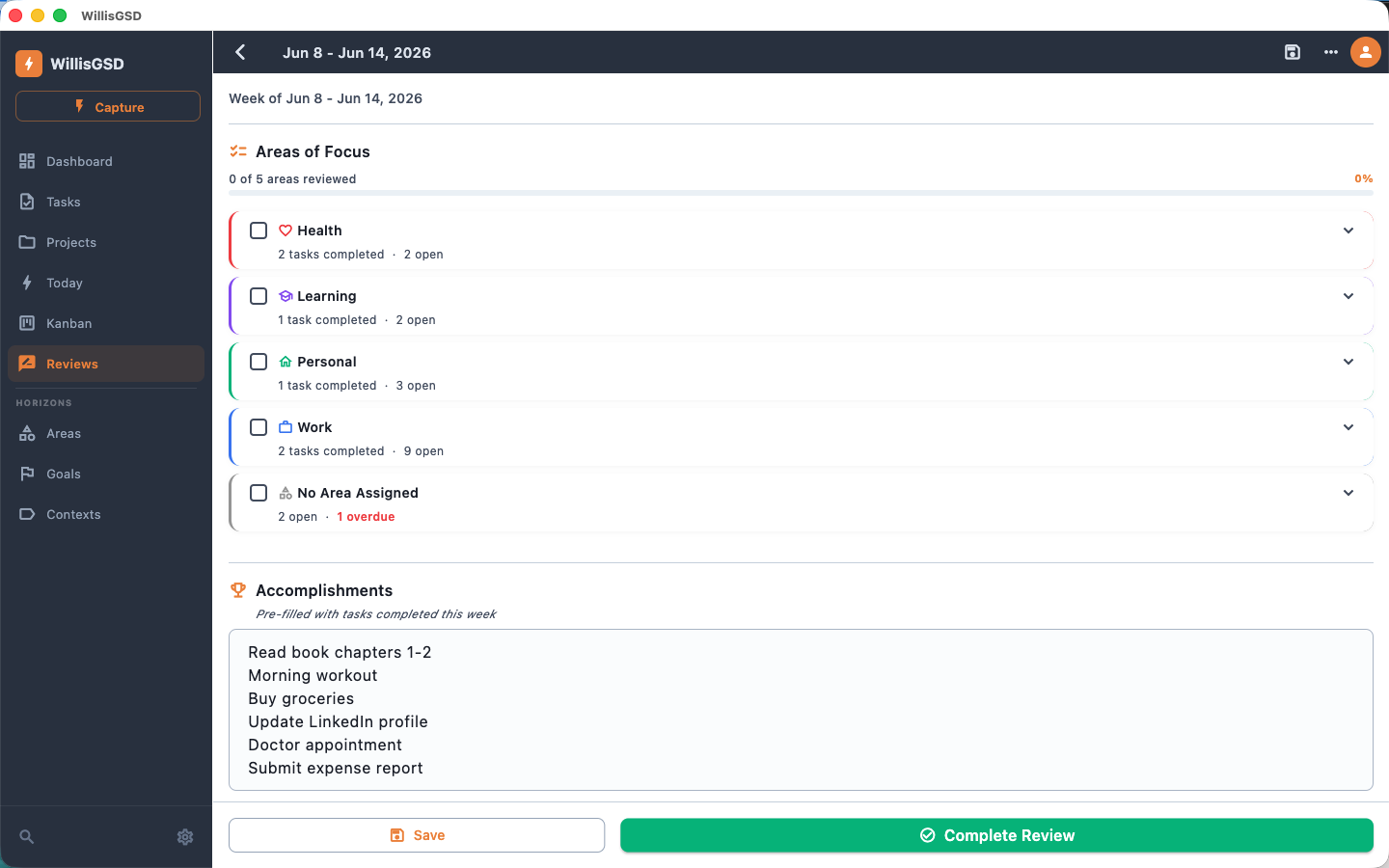
The slate-and-orange Willis theme on macOS — and the same workflow on every platform.
Inspired by Getting Things Done
Built around the five steps from David Allen’s Getting Things Done — with the structure, statuses, and reviews to back them up.
Capture from anywhere
- Quick Capture sheet — one tap from every screen
- Inbox status holds it until you clarify
- macOS global hotkey (Cmd+Shift+Space)
- Siri & Shortcuts — “Add task” by voice
- willisgsd:// deep links & URL capture
- Floating capture window & macOS menu bar
Clarify & organize
- One-at-a-time Clarify flow with 1–7 shortcuts
- Do it now · Next · Delegate · Defer · Someday · Project · Trash
- Areas of Focus → Goals → Projects → Tasks
- Goals with metrics & progress history
- Contexts for energy, location, or tool
- Reference items & tags with quick filtering
Rich task statuses
- Inbox — captured, not yet clarified
- Next Action & In Progress
- Waiting For & Delegated — handed off and tracked
- Deferred (tickler) & Someday/Maybe
- Complete — done and archived
- Tickler dates auto-promote when they arrive
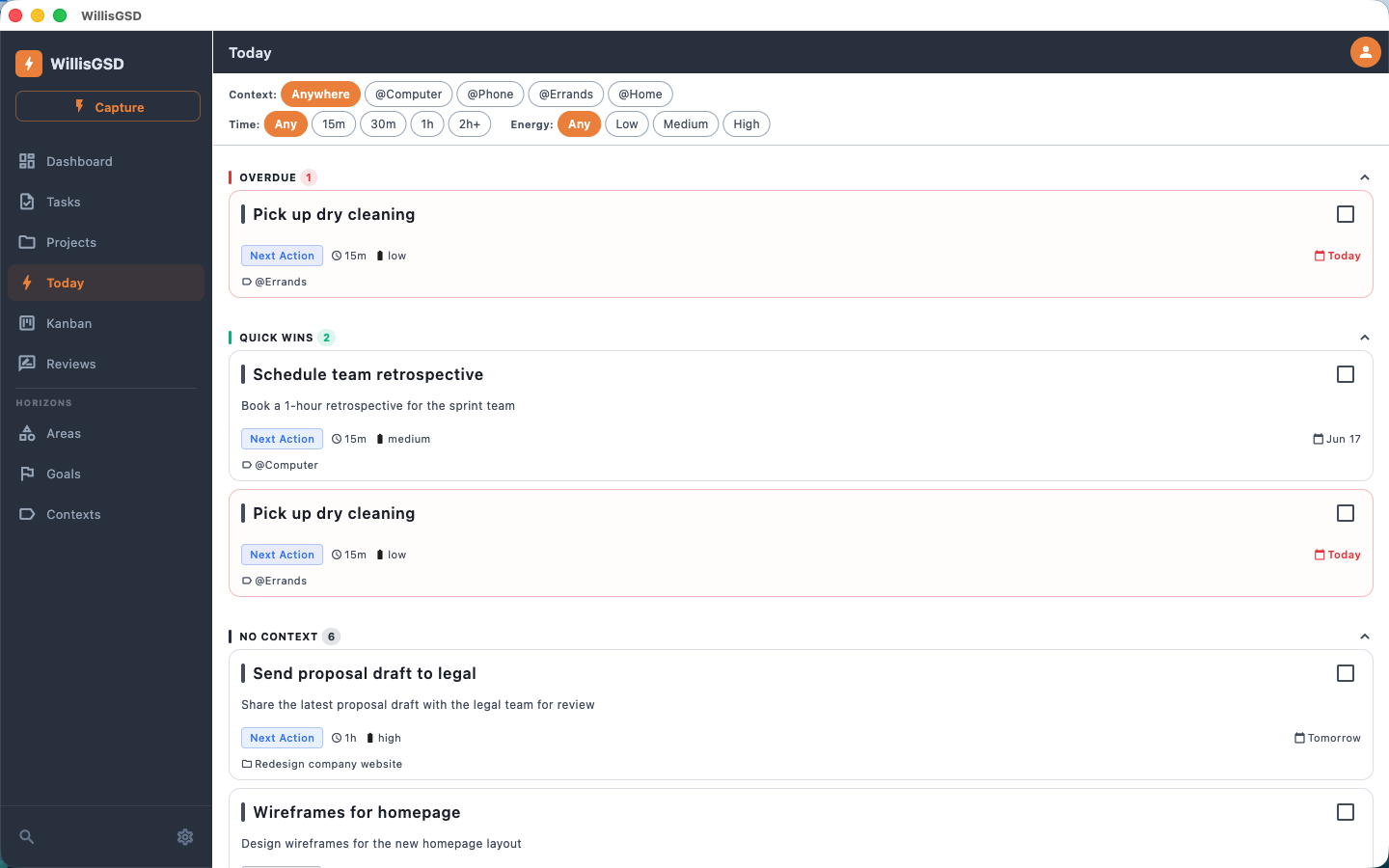
Engage — your Today list
- Filter by context, time available & energy
- Overdue, Due Today & Quick Wins sections
- Next Actions grouped by context
- Calendar view of active tasks
- App-icon due-today badge (iOS/macOS)
- Local reminders, overdue & review nudges
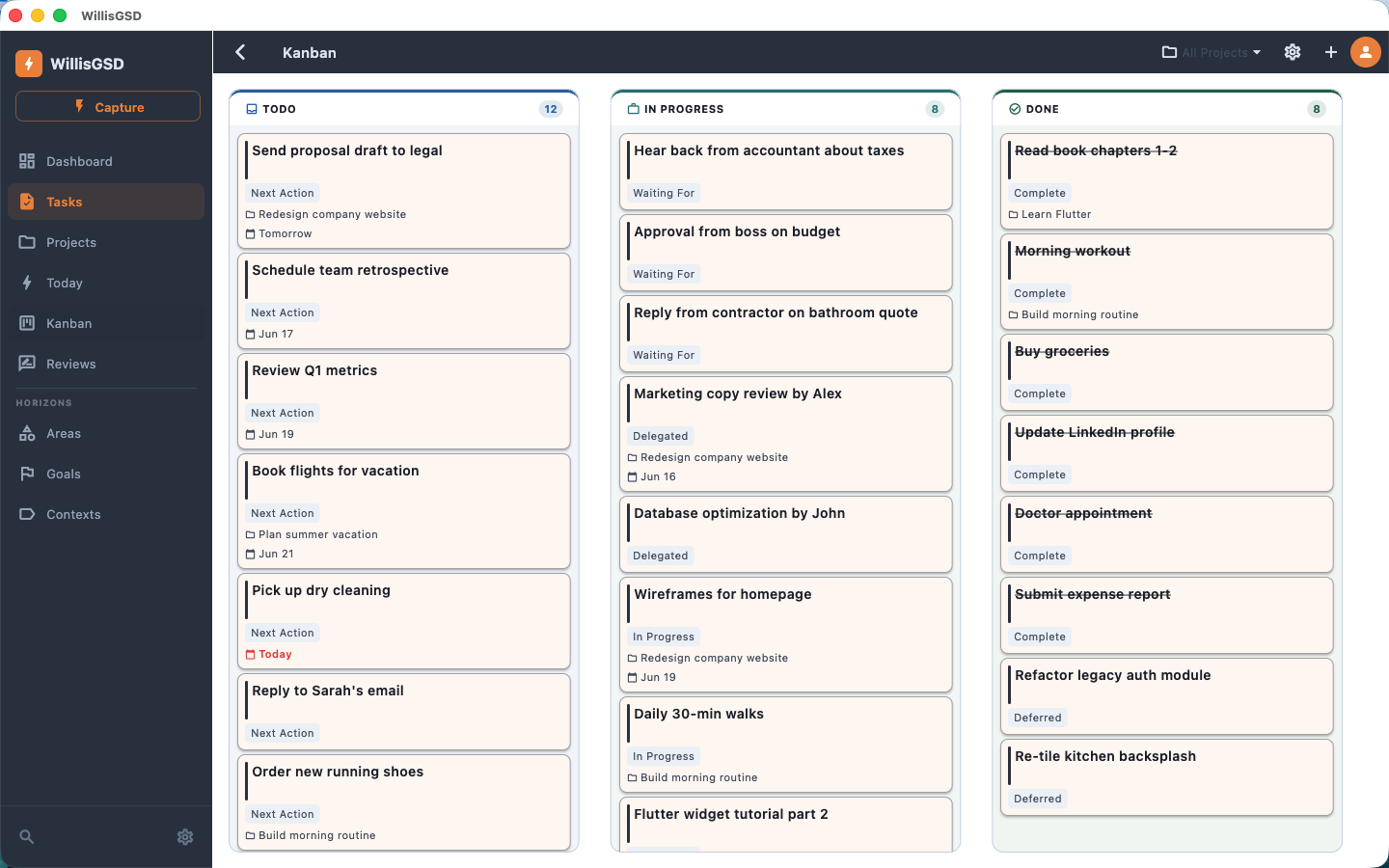
Kanban board
- Drag-and-drop task board
- Fully configurable columns & colors
- Map any combination of statuses to a column
- Tunable Done lookback (7–90 days)
- Independently scrolling columns
- Set Kanban as your default view
Weekly review & reflect
- Area-centric layout — one card per Area
- Tasks grouped by parent project
- Accomplishments & Next Week Focus auto-populated
- Stalled-project warnings (no Next Action)
- Someday/Maybe with Activate buttons
- Free-form notes for reflection
Built to stay out of your way
- Recurring tasks with a full recurrence editor
- Undo on completion · swipe to complete or schedule
- Multi-select for bulk complete/move/delete
- Global search across tasks, projects & goals
- First-run onboarding for newcomers to GTD
- Compact or comfortable task-card density
Privacy first
- Local-first — data lives on your devices
- No accounts, no sign-up, no servers we run
- Zero telemetry, analytics, or tracking
- No ads or third-party SDKs
- Local SQLite database you control
- Read our Privacy Policy
Optional sync that’s still entirely yours
Turn on automatic, conflict-free sync across your devices — with no WillisGSD account and no server we operate. Your data travels through your own iCloud or the cloud folder you already trust, and edits merge cleanly even after a device has been offline.
iCloud
- Automatic sync across Mac, iPhone & iPad
- Uses your private iCloud container
- Nothing to set up beyond a single toggle
Custom folder
- Point at any Dropbox, OneDrive, Google Drive or network folder
- Works on Mac, Windows, Linux, iOS & Android
- One shared vault across every platform
Prefer to keep it simple? You can skip sync entirely and just drop the database file in a synced folder — WillisGSD watches it and reloads when it changes.
One-time purchase. No subscription.
Buy it on the store you already trust. No account required.



Each platform is a standalone, one-time purchase sold through the store you already trust. We don’t offer a cross-platform bundle — verifying one would require us to know who you are. We don’t. That’s the point. Apple’s Universal Purchase means one $19.99 payment covers Mac, iPhone, and iPad. Read our full Privacy Policy →
WillisGSD is a tool, not a service
Most task-management apps charge you annually — $60, $99, sometimes more — for software you rely on every day. We think that’s the wrong model. You buy WillisGSD once and it’s yours. We don’t host your data, we don’t run servers you depend on, and we don’t have a business model that requires you to keep paying to keep your tasks. Future major versions will be offered at a discounted upgrade price — but your current purchase never expires and never stops working.
“Your tasks reveal your life — projects, clients, goals, health, finances. That’s too personal for the cloud. WillisGSD keeps it on your device, in a SQLite file you control.”
Pricing models across popular task managers
| App | Price model | Annual cost | Platforms | Your data |
|---|---|---|---|---|
| OmniFocus 4 | Subscription | $99.99/yr | Apple only | Their servers (optional local) |
| Todoist Pro | Subscription | $60/yr | All platforms | Their servers |
| Things 3 | One-time | ~$80 total | Apple only | Local + Things Cloud |
| TickTick Premium | Subscription | ~$36/yr | All platforms | Their servers |
| WillisGSD | One-time | Pay once, own forever | Mac · Win · Linux · iOS · Android | Your devices only |
Pricing data current as of April 2026. OmniFocus, Todoist, and TickTick pricing sourced from their respective websites.
Ready to get stuff done?
WillisGSD is available now on the App Store, the Microsoft Store, Google Play, and Linux.
Getting Things Done® and GTD® are registered trademarks of the David Allen Company. WillisGSD and Lacy Digital Labs, LLC are not affiliated with, endorsed by, or sponsored by the David Allen Company.