 WillisSDR · software-defined radio
Your FlexRadio,
on every platform.
A modern, cross-platform client for FlexRadio® signature-series radios — the same app on Mac, Windows, Linux, iPad and Android, talking to your radio over its own network protocol. The whole chain: multiple panadapters, up to eight slices, transmit with ATU and a voice keyer, spots drawn on the band, and a built-in CAT server that drives WSJT-X, FLDigi and your logger with no external rigctld.
Fifteen minutes with a FLEX-6500
A complete pass through WillisSDR as it stands today, recorded live against a real radio — the window and the slices, multiple panadapters, spots on the band, transmit, the CAT server, and running the whole station remotely. It is pre-release software and the tour says so where things are still rough. Jump to the part you care about.
Nothing loads from YouTube until you press play — or watch it on YouTube instead.
Built for operators who want a fast, clean radio
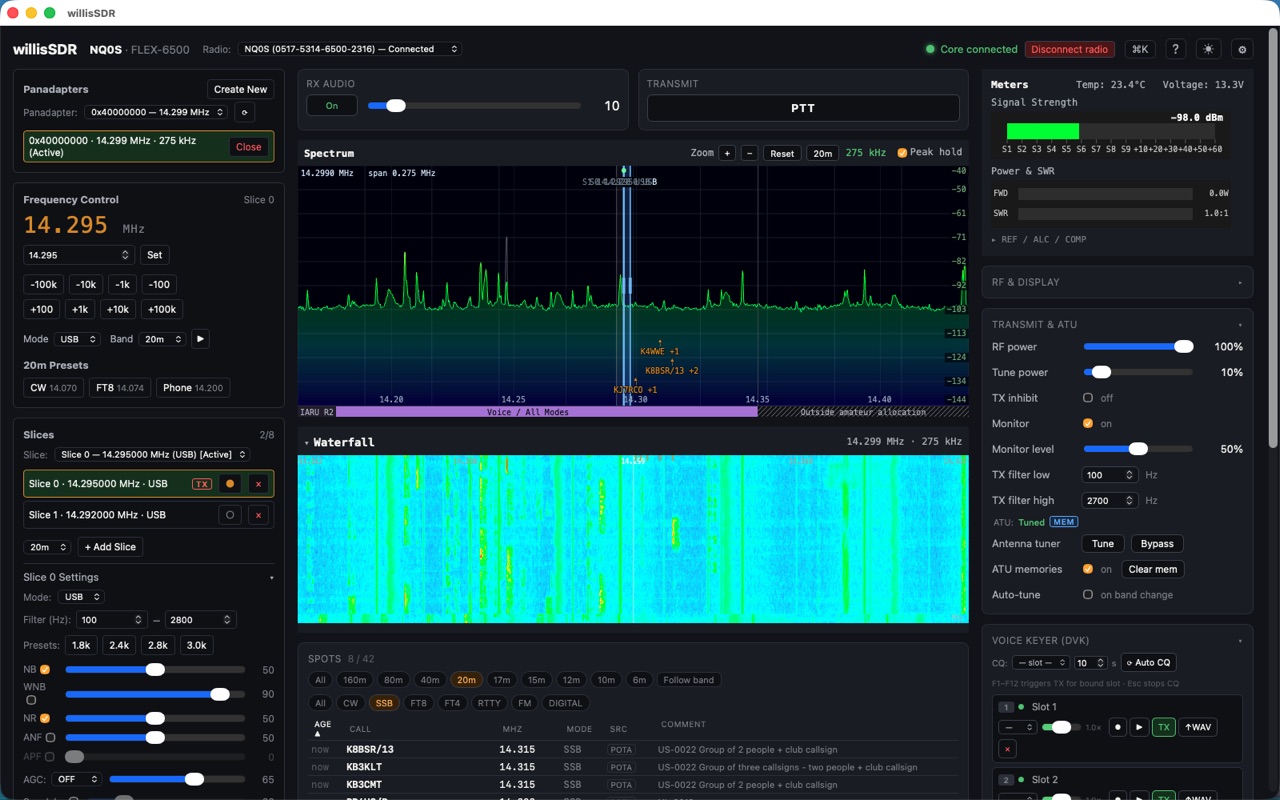
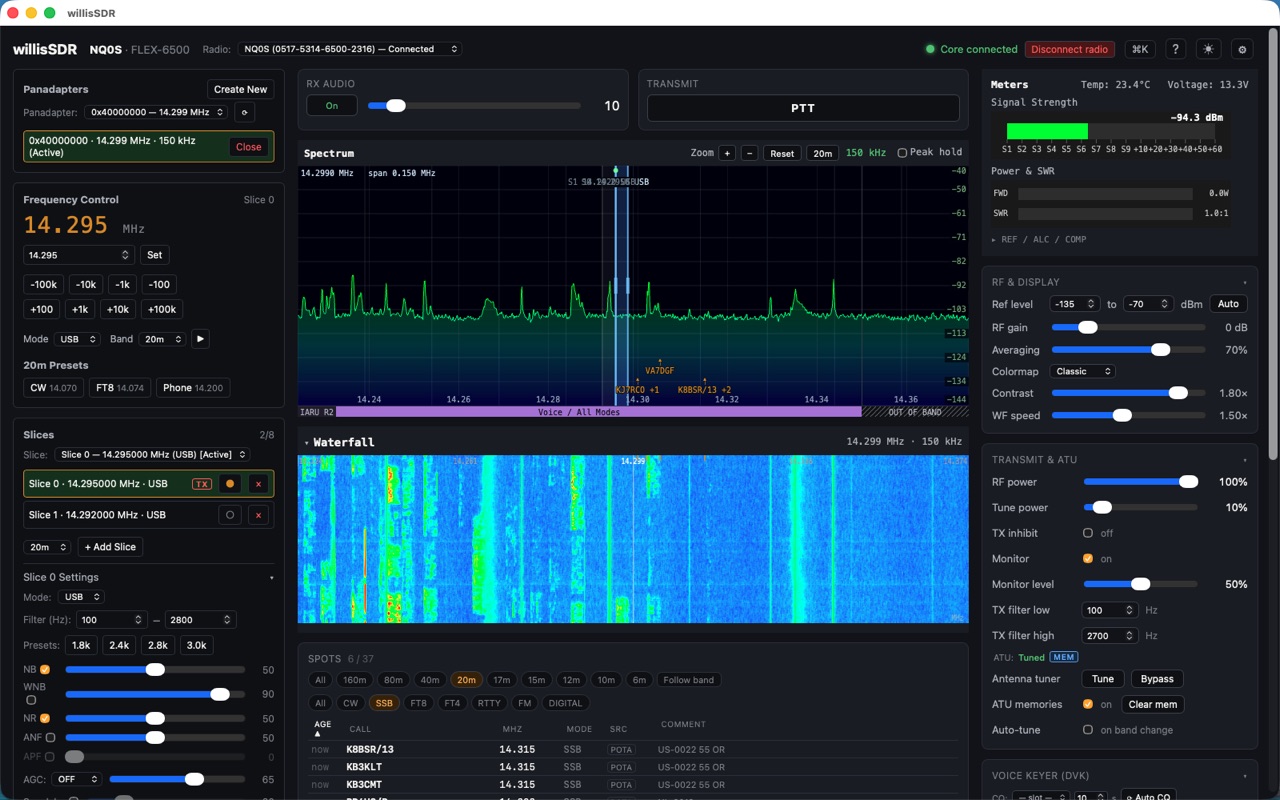
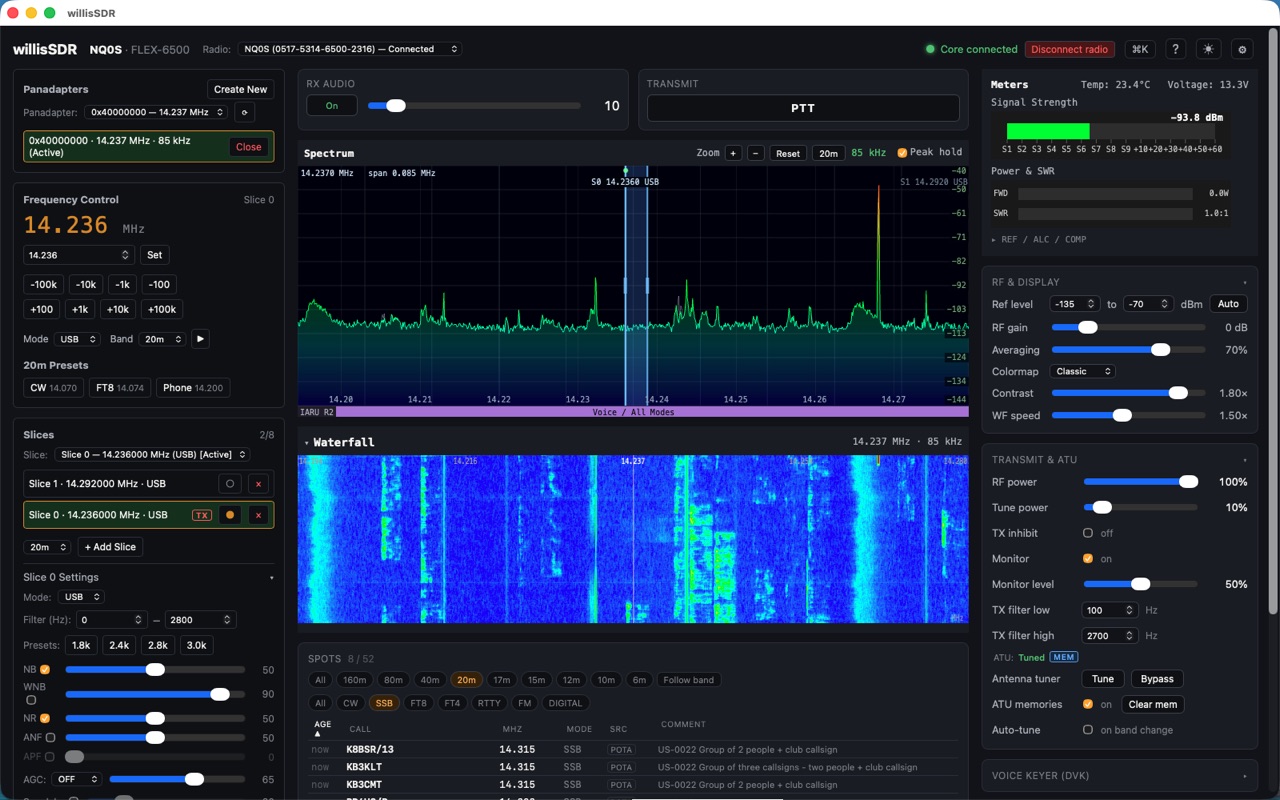
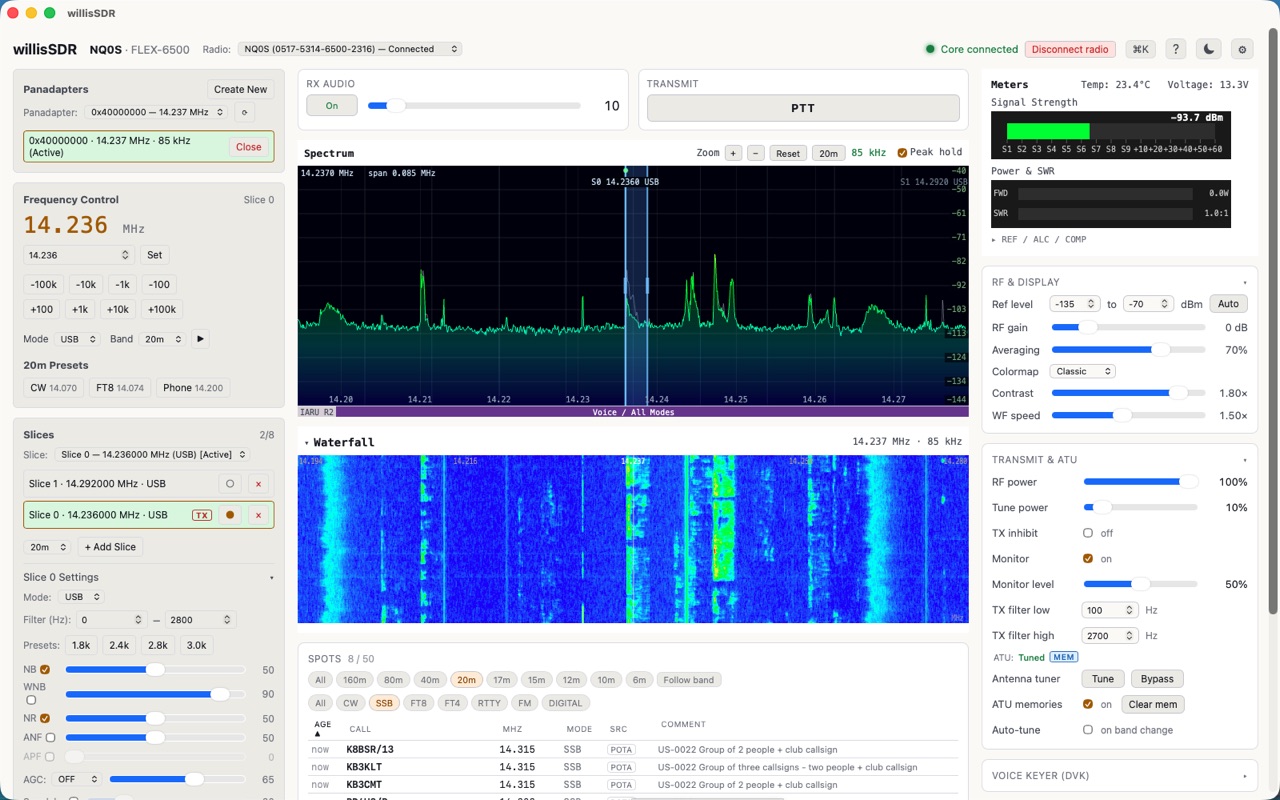
Real screenshots of WillisSDR driving a FLEX-6500 — live spectrum and waterfall, two receive slices, metering, DSP filters and spots, in dark and light.
A complete station front end
Receive, transmit, spots, integration and remote — implemented natively against FlexRadio’s own protocol, with nothing in between.
Discover, connect & profiles
- Auto-discovery of FlexRadio devices on your network
- One-click connect, disconnect and graceful release
- Save and restore full radio configurations
- Band and operating presets, recalled in a click
- No cloud account or broker in between
Panadapter & waterfall
- WebGL spectrum display with peak hold
- GPU-accelerated waterfall with tunable colormaps
- Mode-colored band-plan bar for IARU Region 1, 2 or 3
- Click or drag to tune anywhere on the trace
- General-coverage receive outside the amateur bands
Multiple panadapters
- Several panadapters at once, one per band
- Tiled together with resizable splits
- Or detached into their own windows for a second monitor
- Each detached window is a full panadapter — spots, band plan, zoom and tuning
- Receive audio follows the panadapter you focus
Slices, audio & DSP
- Up to 8 receive slices, each with its own audio
- USB, LSB, CW, AM, FM, DIGU and DIGL
- Filter presets, passband shift, notch and TNF, APF
- Receiver EQ, plus the radio’s noise blanker and noise reduction
- Per-slice S-meter alongside power, SWR, ALC and temperature
Transmit
- Your transmit passband drawn on the panadapter — sideband-correct, split- and XIT-aware
- ATU control, transmit EQ and speech processing
- Split as a mode: transmit follows the slice you select unless you pin it
- Voice keyer with eight slots and automatic CQ
- CW keyer and CW decode — the part still being refined
Spots on the band
- DX cluster, POTA and RBN spots drawn on the panadapter
- Click a spot to QSY straight to it
- Built in — no other software required
- Optional log enrichment when WillisLogger is running
- Worked stations drop out of the list when it is
CAT server, DAX & digital modes
- Built-in CAT server — no external rigctld to install
- Speaks Hamlib NET rigctld and Kenwood TS-2000
- Over TCP or a serial port, several clients at once
- Per-client slice binding and atomic PTT ownership
- DAX audio to and from virtual audio devices — BlackHole, VB-CABLE, PipeWire
Remote operation Experimental
- Run the station server at the radio and operate from anywhere
- Over a network you already run — Tailscale, WireGuard, Nebula
- No vendor relay, no account, no port forwarding
- Reaches you behind carrier-grade NAT and Starlink, where the usual options cannot
- Authenticated with a three-word pairing key, receive-first, with a transmit interlock and operator handover
- Still experimental: one operator at a time, and rough edges remain
Shortcuts, memories & control surfaces
- Keyboard shortcuts throughout the app
- Frequency and mode memories
- Automation for the actions you repeat
- Stream Deck-class controllers via drop-in device profiles
- Light and dark themes, and settings you can export
Truly cross-platform
- The same app on macOS, Windows, Linux, iPadOS & Android
- One Rust core and one interface, not five separate products
- Native experience on each, not a wrapped web page
- Consistent layout and shortcuts everywhere
- A handful of capabilities are desktop-only; the rest is the full application
Private by design
- Talks only to your radio, on networks you control
- No accounts and no servers we run
- Zero telemetry, analytics, or tracking
- Profiles & settings live in local files you own
- Read our Privacy Policy
Where WillisSDR is different — and where it isn’t yet
Measured against the two clients most FlexRadio owners already run. Some of this is ground we hold; one row is ground we have not taken yet, and it is in the table for the same reason as the rest.
| Capability | WillisSDR | SmartSDR for Windows | SmartSDR for Mac & iOS |
|---|---|---|---|
| macOS, Windows & Linux from one app | ✅ | ❌ Windows only | ❌ Apple only |
| iPad | ✅ | ❌ | ✅ |
| Android | ✅ | ❌ | ❌ |
| Multiple panadapters, detachable windows | ✅ | ✅ | ✅ |
| Transmit passband on the panadapter | ✅ included | ➖ SmartSDR+ subscription | ✅ |
| Band-plan / band-edge markers | ✅ included, Region 1/2/3 | ➖ SmartSDR+ subscription | ✅ |
| Spot overlay on the panadapter | ✅ | ❌ | ✅ |
| Remote without a vendor relay or account | ✅ your own VPN † | ❌ SmartLink | ❌ SmartLink |
| Remote behind CGNAT or Starlink, no port forwarding | ✅ † | ❌ | ❌ |
| Two operators on one radio at the same time | ❌ not yet | ✅ MultiFLEX | ✅ |
† WillisSDR’s remote operation is experimental — one operator at a time, and still being hardened.
Comparison based on publicly available information as of August 2026. Capabilities and terms change — corrections are welcome.
One-time purchase. No subscription.
WillisSDR is a tool you own, not a service you rent. Buy it once, per platform.

Each platform is a standalone, one-time purchase — no subscription and no cross-platform bundle. Apple’s Universal Purchase means one $79.99 payment covers Mac and iPad. WillisSDR is on sale now for Linux; the Mac and Windows versions are coming very soon, with iPad and Android to follow. Privacy Policy · License
The radio is yours. The software should be too.
FlexRadio makes exceptional hardware, and SmartSDR® runs on both Windows and Apple platforms — but the Windows and Mac versions are radically different, and Linux isn’t in the picture at all. WillisSDR takes a different approach: one app across Mac, Windows, Linux, iPad and Android, with the same fast panadapter and the same multi-slice workflow wherever you operate. You buy it once, it runs where you run, and it talks straight to your radio with nothing in between.
That last part matters most when you leave the shack. Operating remotely usually means routing your station through somebody else’s relay, tied to an account you have to keep. WillisSDR runs a station server at the radio and lets you reach it over a network you already run — Tailscale, WireGuard, Nebula — so there is no relay to depend on and nothing to forward, which is the difference between operating and not operating if you are behind carrier-grade NAT or on Starlink. It is the newest part of the app and still experimental, but it works, and it works without asking anyone’s permission.
“Your radio speaks a network protocol, not a subscription. WillisSDR just speaks it well — on whatever computer is already on your desk.”
Fire up the panadapter
WillisSDR is available today for Linux — .deb and .rpm, x86_64 and arm64. Mac and Windows are coming very soon, with iPad and Android to follow. Want a heads-up when your platform lands? Reach out through our support center.
FlexRadio®, SmartSDR®, MultiFLEX™, SmartLink™, and the signature series are trademarks of FlexRadio Systems. WillisSDR and Lacy Digital Labs, LLC are independent and are not affiliated with, endorsed by, or sponsored by FlexRadio Systems. All other product and company names are trademarks of their respective owners.